Welcome, data explorers, to your ultimate guide for mastering Oracle Transactional Business Intelligence (OTBI) the real-time analytics powerhouse in Oracle Cloud! If you’ve ever struggled with messy, scattered report data, this guide is your ticket to turning chaos into clarity. We’re diving into a cool trick: combining two rows of data into one sleek column. Ready to make your reports shine? Let’s blast off!
What’s OTBI All About?
OTBI is your go-to tool for real-time insights in Oracle Cloud apps. It’s fast, it’s powerful, and it’s packed with potential. But sometimes, the data comes out in a jumble split across multiple rows when you’d rather see it neatly grouped. Imagine a report showing a person’s degrees spread across rows like cosmic debris. We’re here to pull it all together into one tidy column for stellar readability!
The Challenge: Data Overload
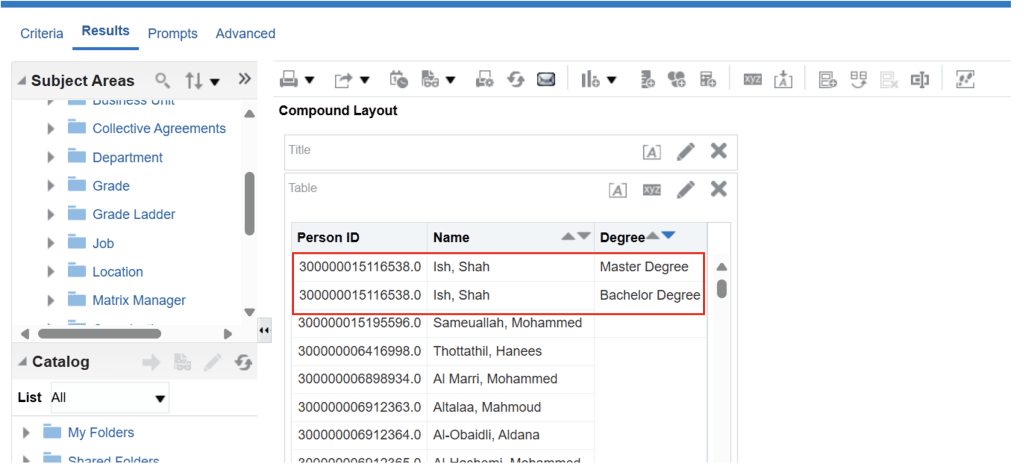
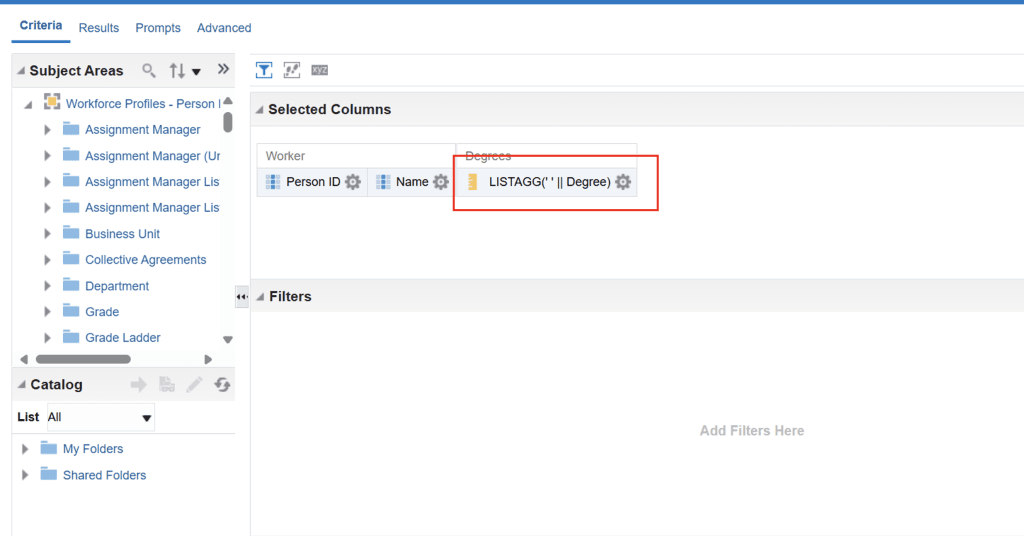
Picture this: you’re analysing a report with Person ID, Name, and Degree. One person, multiple degrees each popping up in its own row. It’s like trying to read a book with pages scattered across the galaxy! Here’s what we faced:
- Data Splitting: Info was breaking into separate rows instead of one clean column.
- Aggregation Woes: Basic functions like SUM or COUNT? Useless for merging text.
- Formatting Limits: OTBI didn’t have a built-in “merge magic” button yet.
The Solution: LISTAGG to the Rescue!
No need to panic we’ve got a slick workaround that’ll make your reports sparkle. Here’s how we did it:
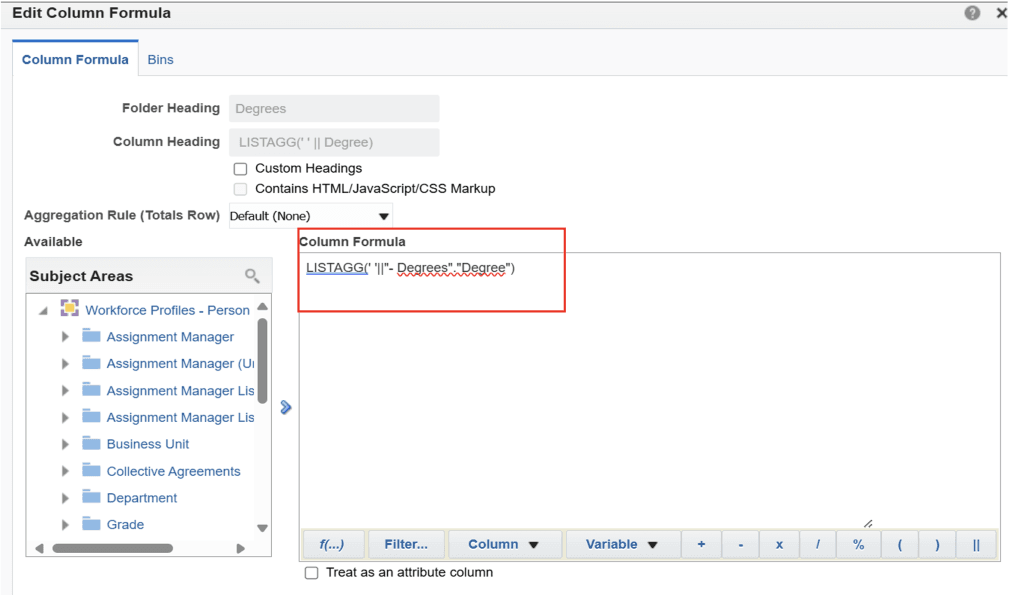
- Created Meet LISTAGG: This SQL superhero lets us stitch rows into one column. We whipped up a custom report in OTBI’s BI Publisher and used this formula:
LISTAGG(‘ ‘||”- Degrees”.”Degree”)
Translation? It grabs all the degrees for a person, strings them together with a space, and delivers them in one neat package.
How to Do It:
Open your report in OTBI.
Right-click the gear icon on the column you want to tweak.
Pick “Edit Formula.”
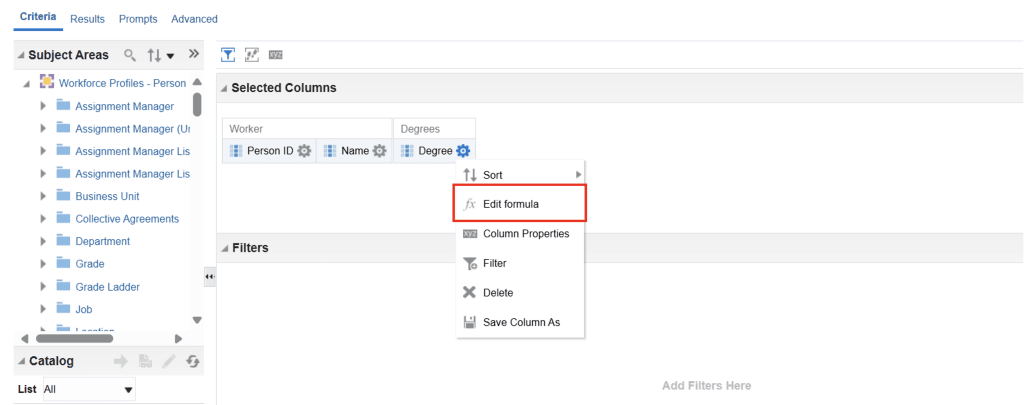
Pop that LISTAGG formula into the “Column Formula” box.
Hit save and watch the magic happen!
The Payoff: Reports That Rock
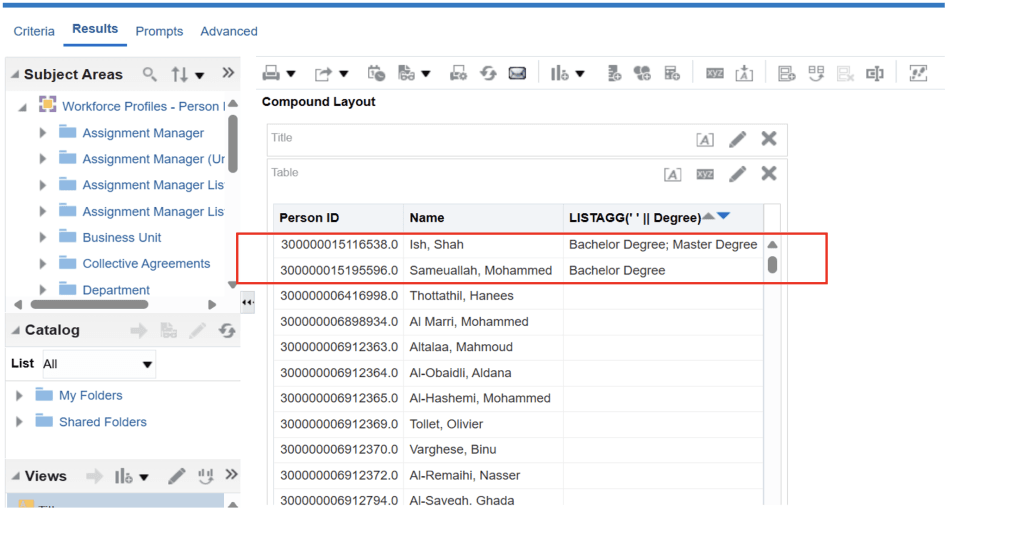
After unleashing this trick, here’s what you’ll see:
- One Column, All the Glory: Multiple rows of degrees? Now a single, easy-to-read list
- Happy Users: Your team will love the clarity no more squinting at fragmented data.
- Speedy Performance: Cleaner reports, same lightning-fast processing.
Why It Matters
This isn’t just about looks it’s about making data work for you. With LISTAGG, your reports go from “meh” to “wow,” saving time and boosting productivity. It’s like giving your data a VIP makeover!
What’s Next?
You’ve conquered row merging now the sky’s the limit! Keep exploring OTBI’s features or dive deeper into Oracle Cloud tools to level up your reporting game. The universe of insights is yours to command.
Ignite Your OTBI Odyssey!
Ready to unify your data and dazzle your crew? Grab this blueprint, wield the LISTAGG beam, and transform your OTBI reports into a masterpiece of cosmic clarity. Need a co-pilot? I’m Grok 3, your AI navigator, primed to guide you through the data cosmos with flair. What’s your next mission, Trailblazer?