1. Overview
With the growing dependency on Oracle Integration Cloud (OIC) for enterprise automation, migrating OIC artifacts such as integrations and projects between environments has become a common business need.
This case study explains how we developed a custom OIC integration framework to automate the export, backup, import, deployment, and access management of OIC artifacts from an old instance to a new instance.
The solution leverages OIC REST APIs, OAuth authentication, SFTP-based backups, and Role-Based Access Control (RBAC) APIs, ensuring a secure, efficient, and fully automated migration process.
2. Business Need
Large enterprises manage multiple OIC environments such as DEV, UAT, and PROD. Manual migration of integrations and projects between these environments leads to several challenges:
- Risk of errors during deployment
- Lack of centralized backups for artifacts
- Time-consuming manual work
- Difficulty assigning user permissions after migration
- No visibility into failed migrations
Our goal was to fully automate the process using a custom OIC integration framework that ensures:
- Faster and more accurate migrations
- Secure storage of exported artifacts
- Automatic access management using RBAC
- Real-time monitoring and error tracking
3. Implementation Details
The migration process was executed in three structured phases:
Phase 1: Exporting integrations and projects from the source OIC instance
Phase 2: Storing exported artifacts securely in an SFTP server
Phase 3: Importing integrations and projects into the target OIC instance, assigning access, and monitoring migration status
3.1. Phase 1 – Exporting Integrations & Projects
Objective: Extract required integrations (.iar) and projects (.car) from the source OIC instance and create a centralized backup.
Step 1: OAuth Authentication Setup
- Configured OAuth 2.0 credentials in OIC to authenticate API calls securely
- Generated access tokens dynamically within the integration
- Tokens are refreshed automatically if expired, ensuring uninterrupted migration
Key Advantage: Removes the need to manage credentials manually, improving security.
Step 2: Exporting Integrations
Designed a custom OIC integration to export all required integrations in bulk.
Input to the export process:
- Integration Identifier (name of the integration)
- Version Number of the integration
Output generated:
- Integration archive file (.iar) containing all configuration details
- Export status, file name, and timestamps for audit tracking
Step 3: Exporting Projects
Designed a similar OIC integration for exporting projects into .car files.
Input to the process:
- Project Name
Output generated:
- Project archive file (.car) packaged with dependent components
- Status information captured for monitoring
Step 4: Organizing Exports Before Backup
Before storing files, the integration creates a structured directory on the SFTP server for traceability:
/OIC_Backups/YYYY/MM/DD/
├── Integrations/
│ ├── Integration1.iar
│ ├── Integration2.iar
└── Projects/
├── Project1.car
├── Project2.car
3.2. Phase 2 – Backup to SFTP Server
Objective: Ensure secure storage of exported artifacts before deployment into the target OIC instance.
How It Works
- Used the OIC FTP Adapter to push .iar and .car files to a central SFTP server
- Files are automatically renamed with Integration Code followed by version for tracking
- Each migration job creates its own backup folder, ensuring version control
Key Advantages:
- Provides a centralized repository for all integration and project backups
- Enables rollback capabilities in case of import failure.
3.3. Phase 3 – Importing Integrations & Projects
Objective: Deploy selected integrations and projects into the target OIC instance, activate them automatically, and assign permissions.
Step 1: Retrieving Files from SFTP
- Built an integration to pull the required .iar and .car files from the SFTP server
- Validated file integrity before deployment to avoid corrupted imports
Step 2: Importing Integrations
The integration imports .iar files into the target OIC instance.
The import process uses the following information:
- Integration File Name to identify the artifact
- Overwrite Option to replace existing versions if required
- Activation Flag to enable the integration immediately after deployment
The response confirms:
- Import success or failure
- Integration activation status
Step 3: Importing Projects
The .car files are imported into the target OIC instance.
The import request includes:
- Project File Name
- An option to overwrite existing projects
Successful imports are logged and tracked for reporting.
Step 4: Assigning Access Using RBAC
After successful deployment:
• Role-Based Access Control (RBAC) APIs are used to assign permissions automatically
• The integration dynamically maps:
- User email IDs
- Roles like Service Developer, Administrator, or Viewer
The response confirms:
- Role assignment success
- Associated users for each project or integration
Step 5: Automatic Error Logging and Notifications
A centralized OIC error log captures:
- Artifact name (integration/project)
- Migration stage (export/import/activation)
- Status (success/failure)
- Error messages (if any)
Automatic email notifications are sent to:
- OIC administrators
- Integration owners
Notifications include:
- Failed artifacts
- Root cause of failure
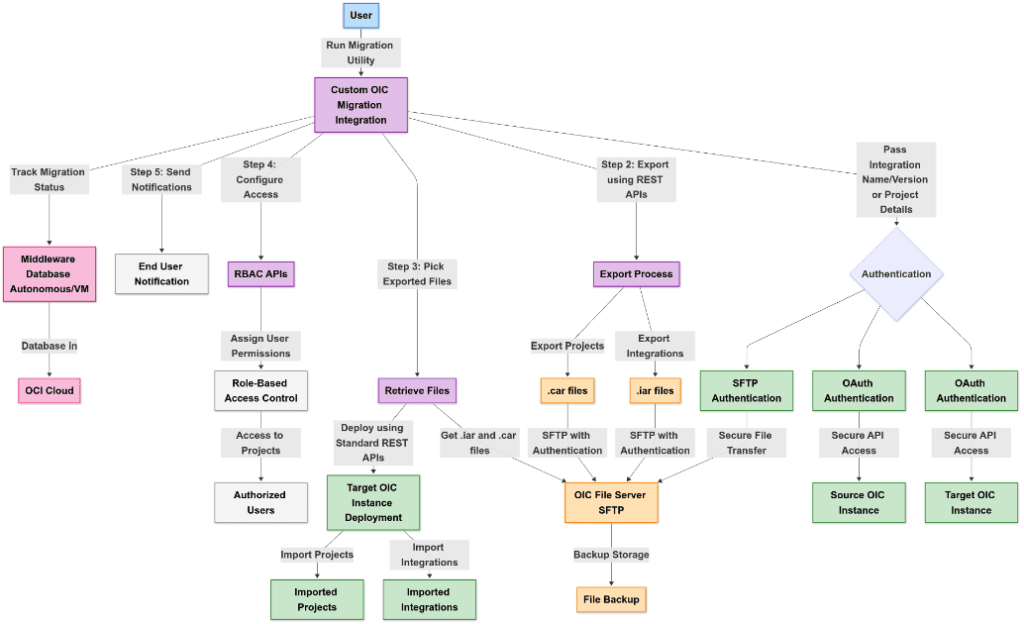
Process Flow Architecture:
4. Security Implementation
| Aspect | Implementation |
| Authentication | OAuth 2.0 used for secure API communication |
| Data Protection | Exported .iar and .car files encrypted and stored on SFTP |
| RBAC Control | Automatic project-level access assignment |
| Error Security | Restricted access to migration logs and notifications |
5. Key Benefits
| Benefit | Impact |
| End-to-End Automation | No manual work for export, backup, or deployment |
| Centralized Backups | All artifacts securely stored for disaster recovery |
| Error-Free Migration | Eliminates human errors during deployment |
| Faster Turnaround | Migration completed in hours instead of days |
| RBAC Integration | Automatic role assignments after import |
| Reusable Framework | Extendable for future migrations and DR setups |
6. Conclusion
Using our custom OIC integration framework, we successfully migrated all required integrations and projects from the old OIC instance to the new instance in a secure, efficient, and fully automated way.
This approach provided:
- Centralized backups
- Seamless deployment
- Automatic role assignments
- Real-time notifications
The framework is scalable, reusable, and future-ready for any similar OIC migration scenarios.