Introduction: Bridging Oracle Fusion with APEX for Smarter Interfaces
In today’s fast-moving digital landscape, businesses demand fast, flexible, and interactive solutions that go beyond traditional ERP capabilities. While Oracle Fusion Cloud Applications offer powerful cloud-based enterprise solutions across ERP, HCM, and SCM, organizations often seek custom reporting or UI enhancements.
That’s where Oracle APEX—Oracle’s low-code development platform—comes in. Using RESTful integration, APEX can seamlessly tap into Fusion’s data, enabling real-time, purpose-built applications without heavy development overhead.
At 4i, we help organizations unlock the full potential of Oracle Fusion by extending its capabilities with APEX. This blog explores how RESTful services make that integration possible and walks through a real-world example of how REST APIs, APEX, and a few custom touches come together to solve key business challenges.
Why APEX + Oracle Fusion?
Oracle APEX allows organizations to rapidly build custom interfaces on top of Fusion data without modifying the core application. Whether it’s dashboards for HR, custom financial reports, or supply chain visibility, APEX provides agility while Fusion maintains integrity.
By leveraging Oracle Cloud Applications (SaaS) REST Services, developers can securely access Fusion’s APIs and design data-driven applications with minimal code.
REST Data Sources in APEX: What You Need to Know
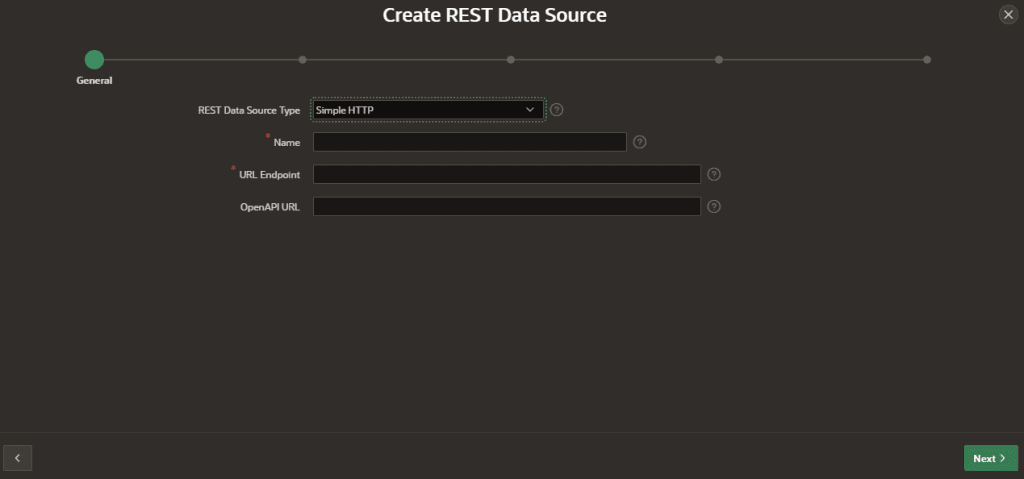
Oracle APEX supports multiple REST Data Source types. For Fusion Cloud integration, the recommended type is:
- Oracle Cloud Applications (SaaS) REST Service – Provides direct and optimized access to Oracle Fusion REST APIs.
Other available options include:
- Simple HTTP
- Oracle REST Data Services (ORDS)
- REST Enabled SQL
- Oracle Cloud Infrastructure (OCI) REST Service
Real-World Example: Building a Dynamic Report from Fusion FSCM
Let’s look at a practical use case where a team needed to build an interactive report in APEX pulling live data from Oracle Fusion Financials (FSCM).
Step 1: Setting Up the REST Data Source
- Go to Shared Components in your APEX application.
- Select REST Data Sources, then click Create.
- Choose Oracle Cloud Applications (SaaS) REST Service.
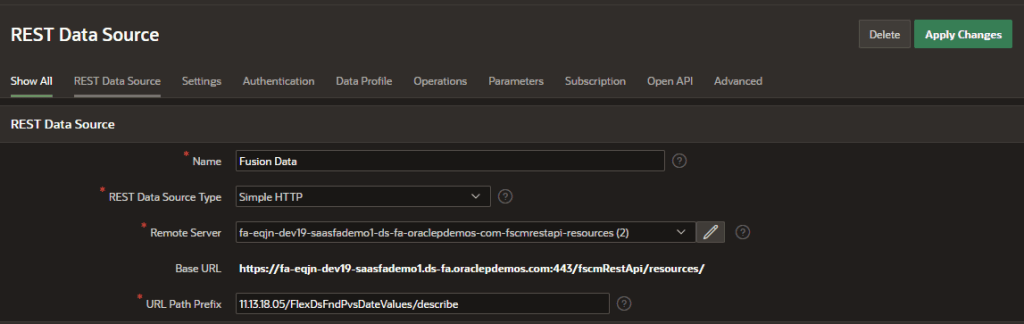
- Enter details:
- Name: Fusion FSCM Data
- Endpoint URL: https://<your-instance>/fscmRestApi/resources/…
- Configure OAuth 2.0 authentication using Fusion’s client ID and secret.
- Preview and validate JSON structure.
Step 2: Build the APEX Report
- Create an Interactive Report Page.
- Link it to the new Fusion REST Data Source.
- Map JSON fields to columns for display.
- Add filters, sorting, and UI enhancements as needed.
Challenges Faced (and Solved)
During integration, a few roadblocks surfaced:
1. API Pagination Limits
- Issue: Fusion REST APIs often return limited records per response.
- Solution: APEX PL/SQL logic was implemented to loop through paginated data, combining all records for the final report.
2. Nested JSON Complexity
- Issue: Some Fusion endpoints return deeply nested JSON data.
- Solution: Used JSON_TABLE and APEX SQL functions to flatten the JSON structure and extract only the needed data.
3. OAuth Setup
- Issue: Initial setup of OAuth credentials can be complex.
- Solution: Fusion security documentation and guided configuration helped streamline setup with Web Credentials in APEX.
Benefits of This Approach
- Real-Time Insights – Reports fetch live data directly from Oracle Fusion
- Faster Development – Minimal coding required with APEX
- Custom UI – Tailored interfaces designed exactly for user needs
- Secure & Scalable – Uses Fusion’s secure OAuth 2.0 and rate-limiting best practices
- Business Flexibility – Teams can modify apps quickly as needs evolve
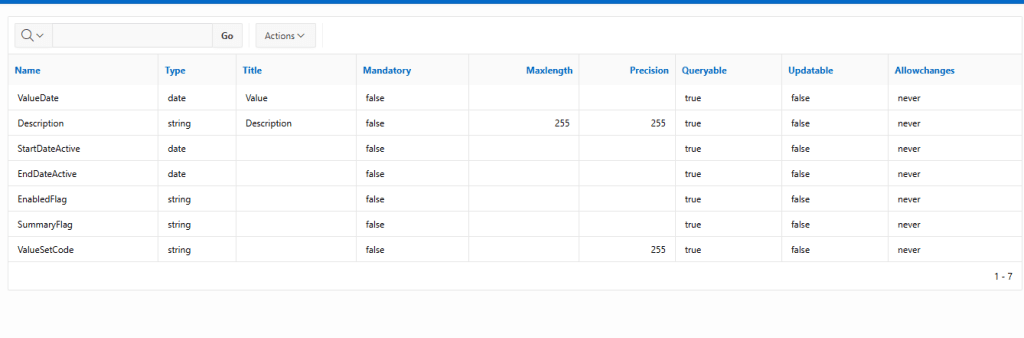
Sample Output: APEX in Action
The result? A sleek, real-time report for financial data showing fields like GL codes, amounts, and effective dates—all sourced directly from Oracle Fusion. The report supports drill-downs, filtering, and export capabilities, offering teams powerful insights in a user-friendly format.
Final Thoughts
At 4i, we believe in simplifying enterprise complexity. Oracle Fusion Cloud Applications deliver immense power—but pairing them with Oracle APEX adds agility and adaptability.
Whether you’re looking to build a simple HR dashboard or a complex supply chain visualization, APEX + Fusion via REST APIs offers a modern approach to application development that’s fast, secure, and built for change.
Need help with your Oracle Fusion + APEX journey? Reach out to 4i—we’ve got you covered.
About the Author
Anuttra Chandran
Sales – Americas | 4i
Passionate about helping organizations transform through digital innovation, Anuttra specializes in Oracle Cloud solutions with a focus on integration, automation, and user-centric design.